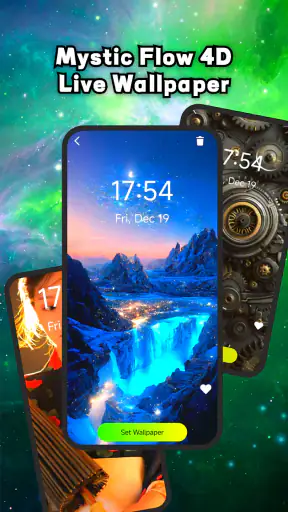
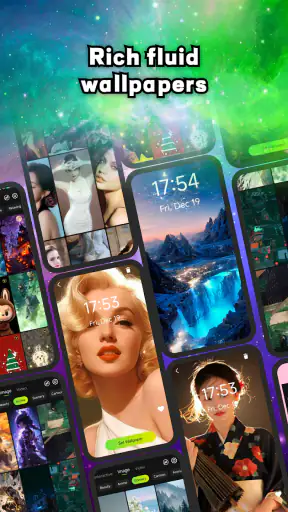
Live Wallpaper: 4K & Video
3.9239.00Reviews
Analysis ByAppCompare
I installed Live Wallpaper: 4K & Video because I wanted to replace a static background with something that felt more personal without turning my phone into a complicated customization project. It is a free Android tools app from Easy Apps & Tools Lab, focused on animated backgrounds rather than widgets, launchers, or full theme management. That narrow purpose is important: it does one visual job, and the experience makes more sense when you judge it as a quick wallpaper workflow instead of expecting a complete home-screen makeover.
My first impression was that the app is aimed at people who already know what kind of mood they want. You may be looking for a moving nature scene, a colorful loop, or a video that makes the lock screen and home screen feel less ordinary. The appeal is immediate, but the useful question is not whether a moving image looks attractive in a preview. It is whether the process from choosing a background to living with it every day remains comfortable.
From a plain screen to a moving background
The starting condition is familiar: I had a phone that worked perfectly well, but its background had become visual wallpaper in the least interesting sense of the word. A static image can be clean and practical, yet after seeing the same picture for weeks, changing it feels like a small way to refresh the device. This app addresses that moment directly by putting animated backgrounds at the center of the experience.
The store presents it as a live wallpaper tool, and that description is more accurate than calling it a general personalization suite. I would not open it expecting icon packs, notification styling, lock-screen controls, or a complete launcher replacement. Its value comes from making motion the main choice. That focus keeps the idea easy to understand, especially for someone who wants a visual change without learning a larger customization system.
The app is listed for Everyone, which fits the straightforward nature of the task. It is also available at no cost, so trying it does not require committing money before deciding whether animated backgrounds suit your phone. That makes experimentation easier: I could approach the first setup as a test rather than a permanent decision.
Before choosing anything, I recommend deciding where the background needs to work hardest. A busy animation may look excellent behind an uncluttered home screen but become distracting once app icons and widgets are added. Conversely, a subtle loop can disappear behind a dense layout. This is one of the less obvious decisions in the process, because the preview can be attractive while the same image is less comfortable during normal phone use.
Choosing the right source for the job
The app’s name points toward two especially useful directions: high-resolution imagery and video-based backgrounds. I treated those as different workflows rather than interchangeable buttons. A crisp still image with motion effects can feel polished and restrained, while a video background is more expressive and may draw attention every time the screen wakes.
For a work phone, I would begin with something slow and low-contrast. The purpose is to add character without making text, icons, or calendar details harder to read. For a personal phone, I would be more willing to choose a stronger visual, but I would still check whether the movement becomes tiring after repeated unlocks. Live wallpaper is something you see many times a day, so novelty is not the same as long-term comfort.
A practical everyday example is a morning commute. I might select a calm animated scene before leaving home, use it through the day, and then decide after several unlocks whether it helps the phone feel more pleasant or simply adds visual noise. That small trial is more revealing than judging the background once while browsing the app.
Another useful scenario is preparing a phone for a child or family member who enjoys colorful screens. The Everyone rating makes the app broadly approachable, but the better choice still depends on the person using the device. A lively background can be fun, while a calmer one may be more suitable for someone who wants the screen to remain easy to scan.
The setup flow and the handoff to Android
Once I had a candidate background in mind, the process moved from browsing inside the app to applying the result through Android’s wallpaper system. That handoff matters because the app can present the visual choice, but the phone ultimately controls how a live wallpaper is assigned and displayed. In practice, I paid attention to the final preview instead of assuming that the first selection would automatically look ideal on every screen.
This is where cropping and composition become important. A background that looks balanced in a gallery preview may place its main subject beneath icons after it is applied. I found it useful to think about the top, middle, and lower portions of the image separately. Leave visual breathing room where shortcuts sit, and avoid putting the most important detail exactly behind a clock or search bar.
The best workflow is preview, apply, unlock repeatedly, then adjust, rather than previewing once and forgetting about it. The first unlock shows whether the motion feels smooth enough for daily use. Opening a few apps also reveals whether the background makes the home screen feel crowded. This simple check is more valuable than chasing the most dramatic animation available.
The app’s current version is 1.11, and it supports Android 9 and later. That gives it a reasonably broad audience among Android users, although the final appearance can still vary with the phone’s screen, software skin, and home-screen arrangement. I would not treat compatibility with the operating system as a guarantee that every device will produce the same visual result.
What happens after the wallpaper is applied
The result is most successful when the animation supports the phone instead of competing with it. On my imagined ideal setup, I would use a background with a clear focal area, moderate movement, and enough contrast for icons. The home screen would feel refreshed, but I could still find an app quickly. That balance is the difference between a useful customization and a novelty I remove after an hour.
One concrete tip is to judge the wallpaper with your actual icon arrangement, not with a clean preview. A background can look excellent before widgets are restored, then become visually overloaded once the normal layout returns. I would also check both light and dark interface elements if the phone changes appearance during the day. A design that works in one mode may lose contrast in the other.
Another tip is to choose motion according to how often the screen wakes. Someone who checks messages constantly may prefer a gentle loop, because even a beautiful animation becomes repetitive when seen dozens of times. Someone who unlocks less often can tolerate a more noticeable effect. This is a trade-off the app cannot decide for you: the right background depends on your habits, not just on image quality.
The app has attracted over a million installs and holds a 3.9 average from around five and a half thousand ratings. I read that as evidence of meaningful interest, but not as proof that every device or preference will produce the same experience. The rating suggests a generally workable idea with room for mixed reactions, which matches my view: the concept is appealing, while the day-to-day result depends heavily on selection and phone behavior.
Where the workflow becomes less comfortable
The main friction is inherent to live wallpaper rather than unique to this app. Motion asks more from a phone than a still image, and the visual effect may not be worth the trade-off for users who prioritize the simplest possible home screen. I would be cautious on an older or already busy device, especially if the phone is used heavily throughout the day. Even when the animation looks attractive, practical comfort should come first.
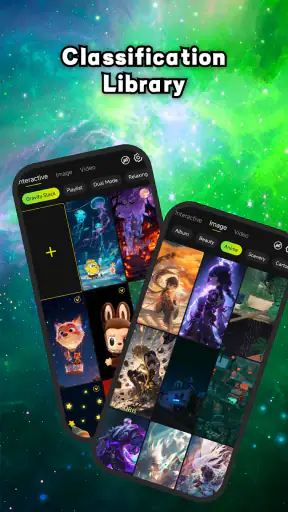
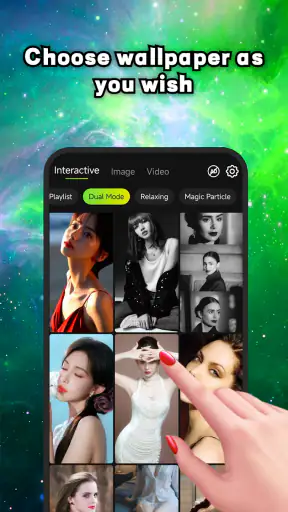
There is also a discovery problem. A large collection can make it tempting to keep browsing instead of making a decision. I found it more efficient to define a style before opening the choices: dark and subtle, bright and energetic, natural, abstract, or video-like. That turns the app from an endless visual feed into a short selection process.
People who want precise control over every part of a wallpaper may find the experience limited compared with a more advanced customization tool. If your goal is to build a complete theme with coordinated icons, widgets, transitions, and automation, this app is probably not the right center of that setup. It is better understood as one focused layer of personalization.
There is a similar limitation for users who already have a carefully organized static wallpaper system. A still background can make text easier to read, keep the screen visually quiet, and avoid the question of whether motion is appropriate in every setting. In that case, the usual gallery or built-in wallpaper picker may be the better option. I would choose this app only when animation itself is part of the goal.
How it compares with ordinary alternatives
The built-in Android wallpaper picker is usually faster when I only want a static image. It is already part of the phone, familiar, and often integrated with the device’s own screen settings. Live Wallpaper: 4K & Video becomes more interesting when the built-in choices feel too limited or when I specifically want animated content rather than a single picture.
A launcher or full theme app can offer broader control, but that breadth often adds more decisions. Those alternatives make sense for someone who wants to redesign the whole interface. This app is the cleaner choice for a narrower task: change the background, keep the rest of the phone familiar, and see whether motion improves the experience.
Dedicated video-wallpaper tools may suit users who want to work from a particular personal clip, while this app’s appeal is the convenience of exploring animated background ideas in one place. I would pick the dedicated route when exact video control matters more than quick discovery. I would pick this app when I want a ready-made visual refresh without turning customization into a project.
The developer, Easy Apps & Tools Lab, has positioned the product clearly as a tool rather than a social platform or entertainment game. That clarity helps, but it also sets a high standard for the basic flow. The app does not need to overwhelm me with options; it needs to help me find a suitable moving background, apply it cleanly, and make the result comfortable for repeated use.
Who should use it, and who should skip it
I would recommend it to Android users who are bored with static backgrounds, enjoy visual customization, and want a free way to try animated screens. It is especially suitable for someone who wants a noticeable change while keeping the phone’s launcher and icon layout intact. The focused purpose makes it approachable for casual experimentation.
I would be more selective for people who value maximum battery efficiency, distraction-free screens, or very precise theme control. If you already know that motion irritates you after repeated exposure, the app will not solve that preference. If you need a complete interface redesign, a broader customization solution will likely be a better fit.
Parents and users setting up a simple phone should also think about readability before appearance. The Everyone content rating is reassuring for broad use, but a visually intense background can still make a device harder to navigate. I would choose a calm design, apply it, and ask the actual user to perform ordinary tasks rather than judging the result on looks alone.
My final assessment after following the full workflow
Live Wallpaper: 4K & Video succeeds when I treat it as a focused visual tool: start with a plain screen, choose a style that matches my habits, preview it with the real home-screen layout, apply it through Android, and live with the result before deciding whether it stays. The strongest part is the immediate transformation from static to animated. The weakest part is that the final quality depends on personal selection, screen composition, and tolerance for motion.
With a 3.9 average and a large installed audience, it is clearly more than an obscure experiment, yet I would not recommend installing it blindly just because animated backgrounds look impressive in a preview. The free price makes testing easy, and the Android 9 minimum keeps it accessible to many devices. My advice is to begin with a restrained background, check readability and repeated unlocks, and only then try something more dramatic.
For me, this is a worthwhile choice when the goal is a quick, visible refresh rather than a complete theme overhaul. It adds personality without asking me to rebuild the phone around it. If you want motion but still want your familiar Android layout, this is the kind of focused tool I would try first; if you want silence, efficiency, or deep customization, a static picker or full theme system will serve you better.
FAQ
What is Live Wallpaper: 4K & Video?
Live Wallpaper: 4K & Video is a personalization app that lets you decorate your Android or iOS device with animated backgrounds, high-resolution 4K images, and video wallpapers. After installing it, users can browse different categories, preview effects, and choose a background for the home screen, lock screen, or both, depending on the device’s operating system and supported settings.
Does Live Wallpaper: 4K & Video contain free wallpapers?
The app generally offers a selection of wallpapers that can be downloaded or applied without payment, although some premium designs, collections, or features may require a subscription or one-time purchase. Before confirming a download, check whether the wallpaper is marked as free or premium. Availability can also change with updates, regional restrictions, and the developer’s current pricing policy.
Will video wallpapers affect battery life or device performance?
Animated and video wallpapers normally use more battery and system resources than static images because the device must continuously render motion. The impact depends on the video length, resolution, frame rate, screen brightness, and phone hardware. On older or less powerful devices, you may notice faster battery drain, increased memory usage, or occasional lag, especially when using demanding 4K content.
Can I use my own videos as live wallpapers?
Depending on the version and operating system, Live Wallpaper: 4K & Video may allow users to select videos stored on their device and convert them into animated backgrounds. However, not every phone supports video wallpapers in the same way, and iOS and Android have different restrictions. If the import option is unavailable, you may be limited to the wallpapers provided inside the app.
Is Live Wallpaper: 4K & Video safe to download and use?
The application should be downloaded from the official Google Play Store or Apple App Store rather than from unofficial websites. Before installing, review the listed permissions, privacy policy, subscription terms, and recent user feedback. A wallpaper app normally needs access to media files if you import personal videos, but permissions unrelated to personalization should be considered carefully before approval.
Pros
- Large 4K collection with sharp visuals on modern screens.
- Video wallpapers add more motion than standard static backgrounds.
- Simple browsing makes it easy to preview and apply wallpapers.
- Supports personal videos for a more customized home screen.
- Regular content updates can keep the wallpaper selection fresh.
Cons
- Animated wallpapers may noticeably increase battery consumption.
- Some high-resolution downloads require considerable storage space.
- Certain features or wallpapers may be locked behind subscriptions.
- Video playback can use extra memory on older or budget devices.
- Wallpaper compatibility may vary across Android launchers and models.